
Free Ressources
Click the button below to discover a curated selection of DAWs (Digital Audio Workstations), VSTs and VSTis (Virtual Instruments and audio tools), and digital distributors to help you get your music onto all major streaming platforms, including Spotify, Deezer, and Apple Music.
I regularly update this list with my latest findings. Every resource featured is entirely free and legal, giving you everything you need to dive into music production with complete peace of mind.
If you would like to support my research and curation efforts, feel free to join my Patreon community or purchase my music directly on Bandcamp.
How can you launch your tracks on global streaming platforms without breaking the bank ? For the past few years, the go-to solution has been digital music distributors (or aggregators). The catch ? The majority of them (DistroKid, TuneCore, iMusician, CD Baby) rely on paid subscriptions or hidden fees that can quickly discourage independent artists and beginners.
This free music distribution tutorial reveals the best alternative to share your music internationally without spending a single cent : RouteNote.
I have tested several distributors in the past (such as DistroKid, iMusician, and TuneCore), but they all suffered from recurring flaws or a lack of professionalism that frustrated me - especially when some of my tracks were stolen. With RouteNote, I finally found smooth communication from the very start : their understanding and responsiveness have been incredibly reassuring compared to my past experiences.
💡 Why Choose RouteNote for Free Music Distribution ?
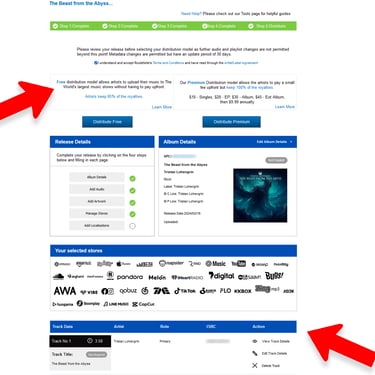
RouteNote offers a 100% free plan that is perfect for launching your singles, EPs, or albums :
Zero upload fees or annual subscription costs.
You keep 85% of your royalties (earnings), as the platform only takes a 15% commission.
Flexible upgrades : You can switch to their Premium plan at any time to collect 100% of your music revenue-an option worth exploring once you analyze your music's profitability over a few months.
🛠️ Step-by-Step Guide : Publishing Your Music on RouteNote
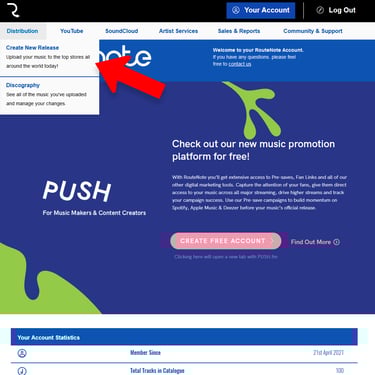
1. Account Creation and Setup
To get started, create your artist profile using my RouteNote affiliate link (always keep your bearings !).
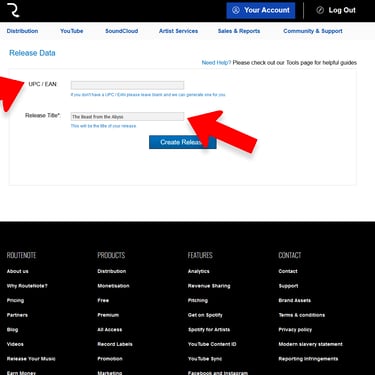
2. Creating Your Release
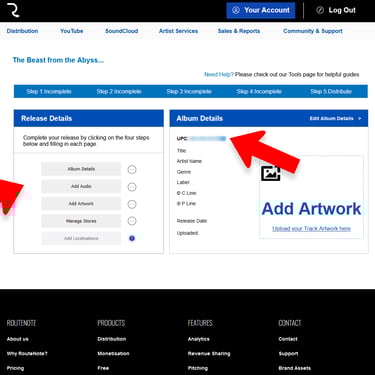
Enter your single or album title. The UPC / EAN code (your project's barcode) will be generated automatically and completely free of charge by RouteNote. For my part, I tested this out with an old track that was just sitting on my hard drive.
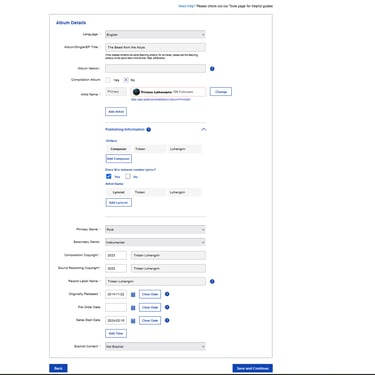
3. Filling Out Album Metadata
Once the project is created in your artist catalog, you need to complete the essential details :
Artist Name : Enter your pseudonym or band name. Do not forget to add your collaborators as a Featuring artist or co-writer.
Musical Genres : Select the styles that match your work. On this point, I find that RouteNote sometimes lacks precision in its sub-genres, so you will need to make a strategic choice.
Copyrights & Dates : Fill in your copyright details and the official release date. If your track was previously published elsewhere, make sure to enter the exact original release date!
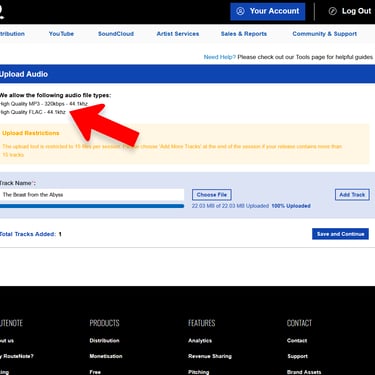
4. Uploading the Audio File
You must upload your track in FLAC format (44.1 kHz). This guarantees high-definition audio quality, which is essential to withstand compression from platforms like Spotify or Apple Music.
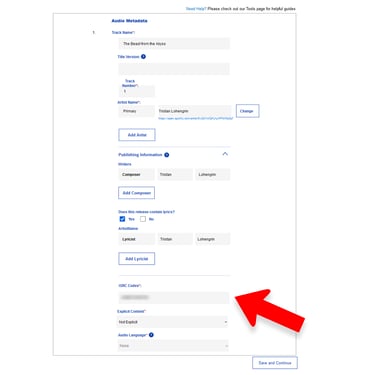
5. Retrieving Your ISRC Code
Once your audio is approved, your ISRC code will be displayed. This is the official, unique digital ID for your song. Personally, I centralize all my ISRC codes in an Excel spreadsheet to find them in the blink of an eye, and I highly recommend you do the same.
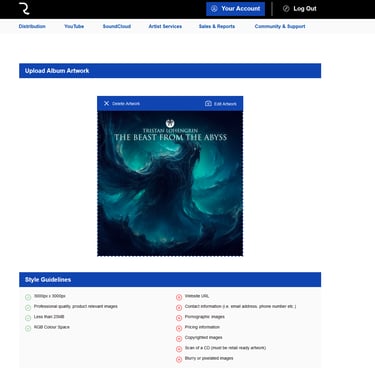
6. Importing Your Cover Art (Artwork)
Upload your cover image as a 3000 x 3000 pixel JPG.
Note : the image must be royalty-free / own creation / commission. If you use copyrighted elements without permission, your project will be rejected.
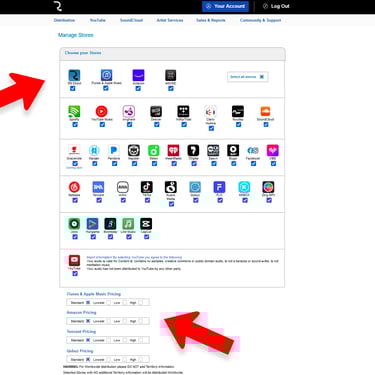
7. Selecting Streaming Platforms
Simply check the "Select all Stores" option to enable omnichannel distribution across all global partners (Spotify, Deezer, Amazon Music, TikTok, etc.). It’s straightforward, seamless, and highly effective.
⚠️ The YouTube Content ID Rule :
If you want to activate automatic monetization on YouTube, your track must not contain any royalty-free samples, must not be under a Creative Commons license, and cannot belong to the public domain. The platform is ruthless with cheaters. If you meet the criteria, absolutely check this box, as YouTube remains one of the highest-paying channels. On my end, I keep the pricing at the standard rate for digital download stores, but you are free to adjust the price tier.
8. Finalizing and Distributing
Accept the terms and conditions, then click "Distribute Free".
Your project will instantly be sent to RouteNote's moderation team for review before going live officially !
Please note that the distribution process can take anywhere from a few days to a few weeks to reach all stores. Because of this timeline, it is essential to anticipate the delay and plan your release date well in advance to ensure a successful launch.
9. Claim Your Artist Profiles for Maximum Visibility
Once your music is delivered to the stores, your work isn't really quite done. To significantly boost your visibility and track your performance, you should absolutely claim your official profiles on major artist portals. For example : Spotify for Artists.
Claiming your profile allows you to pitch your upcoming music to official playlists, customize your visual identity, and analyze listener demographics to optimize your promotional strategy.
🤝 Transparency & Support
The affiliate link in this tutorial allows me to earn a 2% commission paid directly by RouteNote out of their own share.
This changes absolutely nothing about your 85% earnings : it is simply a completely free, passive way to support my work as a creator !
If you prefer to enter my referral code manually during registration, here it is : 2f8e11f6
Now it's your turn ! All the tools are in your hands to finally get your music out into the world.
How to Distribute Your Music for Free
on Spotify, Apple Music, and Deezer